Reviews
Center Block Defender Arcade delivers a clean, focused challenge. The controls are intuitive, and the increasing difficulty keeps each round engaging. It is a great choice for players who enjoy testing their reaction time without complex rules. The free-to-play model and no downloads make it accessible to everyone.
About this game
Game Introduction
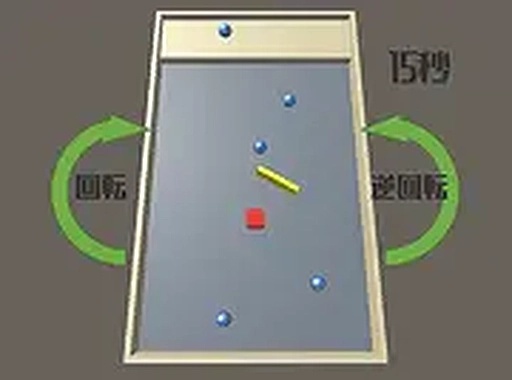
Center Block Defender Arcade is a straightforward yet challenging game where the main goal is to keep a central block safe from rolling balls that approach from different directions. The game is easy to learn but becomes more difficult as you progress, providing a satisfying test of your reaction time and focus. It is designed for players of all ages and is completely free to play. The simple premise and gradually increasing difficulty ensure that each session feels fresh and rewarding. Whether you have a few minutes or want a longer challenge, this game offers endless entertainment. The core objective is clear: protect the block in the middle of the screen for as long as possible.
How to Play
Players use the keyboard arrow keys or mouse to move an incoming ball left or right across the screen. The aim is to intercept and block the rolling balls before they reach the central block. Each successful block keeps the game going, while a collision ends the round. The controls are responsive and intuitive, allowing players of any skill level to start immediately. As you progress, the balls come faster and from more angles, increasing the challenge. Staying focused and reacting quickly are key to protecting the block for as long as possible.
Game Features
Simple controls that are easy to learn. Increasing difficulty that keeps the game engaging. Free to play with no downloads required. Full screen mode for a more immersive experience. Endless replay value as you try to beat your high score.
Tips for Success
Practice regularly to improve your reaction time. Focus on the center of the screen to anticipate incoming balls from all directions. Stay calm as the speed increases, and avoid sudden movements that could throw off your aim. Learning the rhythm of the ball patterns can help you predict their paths. Take short breaks if you feel frustrated, as a clear mind leads to better performance. Challenge yourself to beat your previous high score to stay motivated and sharpen your skills.
Compatibility
✅ This game supports:
- Desktop browsers (Chrome, Edge, Safari)
- Mobile browsers (Chrome on Android, Safari on iOS)
❌ Does NOT support: - Internet Explorer - Very old browser versions
👉 Try refreshing or updating your browser
Advertisement
Faq
Is Center Block Defender Arcade available on mobile devices?
The game is designed for desktop browsers, but some players may access it on mobile devices if the browser supports keyboard or touch input. For the best experience, a keyboard or mouse is recommended.
Can I play Center Block Defender Arcade offline?
No, the game requires an internet connection to play. It is hosted online and does not require any downloads, so you need a stable connection to access and enjoy the game.
Are there any in-game purchases or ads in Center Block Defender Arcade?
The game is completely free to play with no in-game purchases. It may include advertisements as part of the free model, but there are no paywalls or premium features.
How is the difficulty level determined in Center Block Defender Arcade?
The difficulty increases gradually as you play. Balls come faster and from more angles over time, making it harder to defend the central block. There are no selectable difficulty settings; the challenge adapts based on your performance.
Does Center Block Defender Arcade save my high score?
Yes, the game typically saves your highest score locally in your browser. This allows you to track your progress and try to beat your personal best each time you play.
Can I share my score from Center Block Defender Arcade with friends?
The game may not have a built-in sharing feature, but you can manually share your score by taking a screenshot or noting it down. Some browser versions might allow sharing via social media if supported.